
| 일 | 월 | 화 | 수 | 목 | 금 | 토 |
|---|---|---|---|---|---|---|
| 1 | 2 | 3 | 4 | 5 | 6 | 7 |
| 8 | 9 | 10 | 11 | 12 | 13 | 14 |
| 15 | 16 | 17 | 18 | 19 | 20 | 21 |
| 22 | 23 | 24 | 25 | 26 | 27 | 28 |
- cloudmessage
- MotionLayout
- BLUETOOTH
- 채팅방구현
- 개발일지
- ERD툴
- ERDTool
- node.js
- android pdf viewer
- 암호화
- socket통신
- android studio
- 상태관리
- FCM
- PDFViewer
- DevExpress
- EC2
- 그룹채팅구현
- androidstudio
- Android
- provider
- node js
- 계층형 테이블
- AWS
- 서버배포
- Serial
- firebase
- erdcloud
- Flutter
- socket.io
- Today
- Total
nueog
[SVG] svg태그 선/모양 그리기 본문
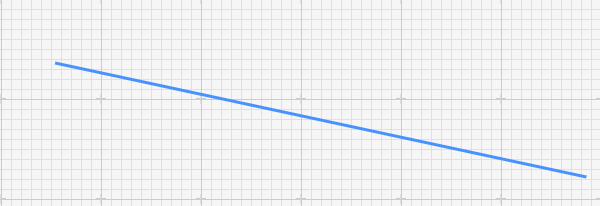
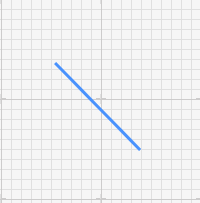
위와 같은 선을 만들려면 svg 태그안의 line 요소를 활용할 수 있다.
기본적인 구조는 다음과 같다.
<svg>
<g stroke="#4992fd" stroke-width="1" fill="none">
<line x1="254" y1="164" x2="339" y2="251" stroke="#4992fd" stroke-width="3"></line>
</g>
</svg>
여기서 stroke 요소는 채색 요소를 의미한다. 여기서는 색상 코드 #4992fd 와 두께를 3px로 지정해주었다.
하나의 svg 태그에 여러개의 line 요소를 넣고 싶다면, g 태그를 여러개 자식 요소로 넣어주어서 다음과 같이 구성한다.
<svg>
<g stroke="#4992fd" stroke-width="1" fill="none">
<line x1="254" y1="164" x2="339" y2="251" stroke="#4992fd" stroke-width="3"></line>
</g>
<g stroke="#4992fd" stroke-width="1" fill="none">
<line x1="354" y1="164" x2="339" y2="251" stroke="#4992fd" stroke-width="3"></line>
</g>
<g stroke="#4992fd" stroke-width="1" fill="none">
<line x1="154" y1="164" x2="339" y2="251" stroke="#4992fd" stroke-width="3"></line>
</g>
</svg>
line 요소 말고 다른 그리기 모드를 택하고 싶으면 다음과 같은 요소가 있다.
1. <rect>
2. <circle>
3. <path>
https://www.w3schools.com/graphics/svg_intro.asp
SVG Tutorial
W3Schools offers free online tutorials, references and exercises in all the major languages of the web. Covering popular subjects like HTML, CSS, JavaScript, Python, SQL, Java, and many, many more.
www.w3schools.com
위의 링크를 참고해서 사용하고자하는 요소를 선택하면 된다.
끝!
'Web' 카테고리의 다른 글
| [JavaScript][dom-to-image] dom element 요소 이미지 태그로 바꾸기 (0) | 2022.06.22 |
|---|---|
| [C#] 웹서버에서 Android 앱으로 FCM 전송 (0) | 2022.06.02 |
| [IIS] 서버 배포 / 포트 문제 해결 (0) | 2022.05.13 |
| css정리5 - 포지셔닝 / float (0) | 2021.11.19 |
| css 정리 4 - display (0) | 2021.11.17 |

